Description
The thing that matters is buried under a thousand emails.
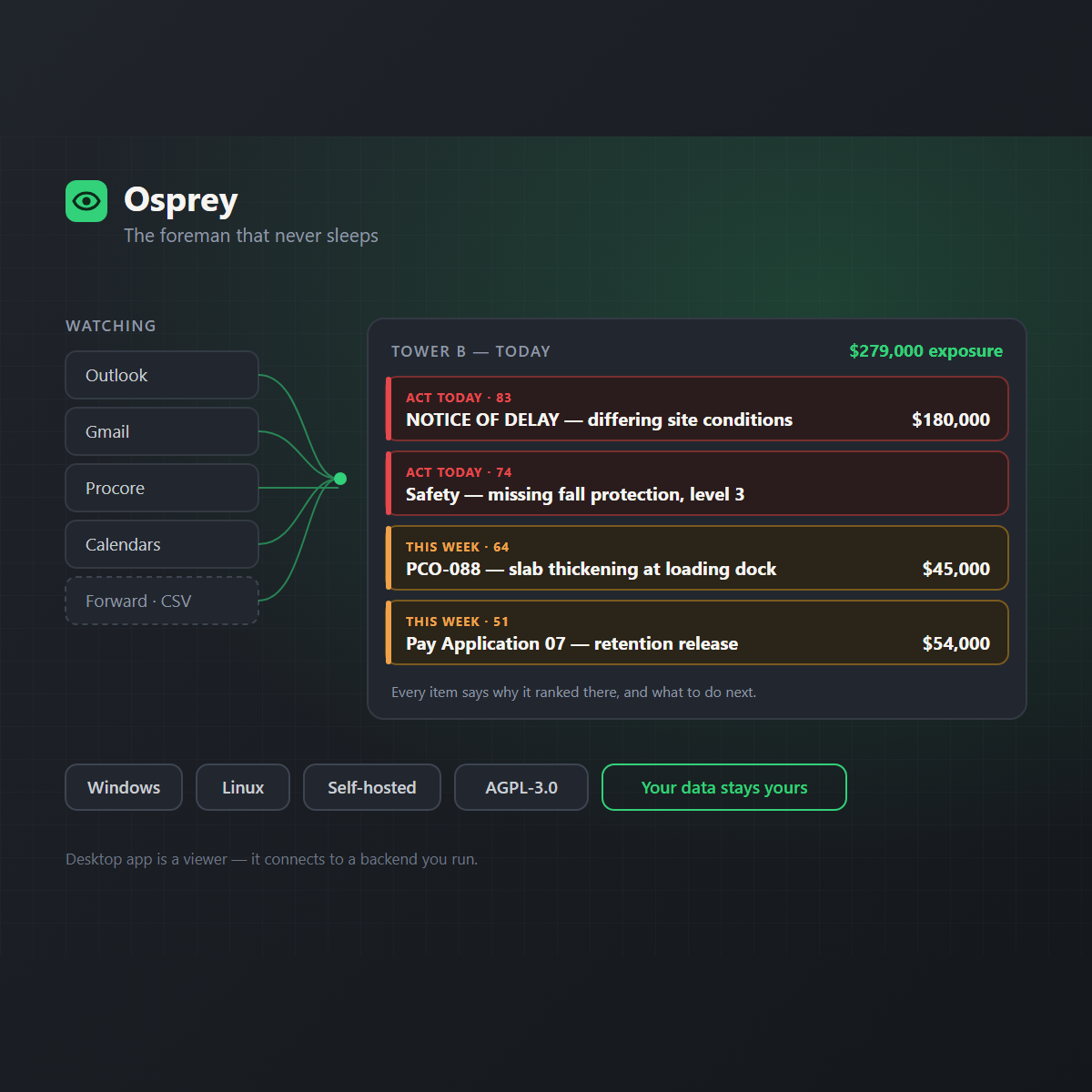
Osprey watches Outlook, Gmail, Google Calendar and Procore at once and hands you the five items that actually need you today — each with why it ranked there, the dollars and schedule at stake, the deadline, a link back to the source, and a recommended next move.
Contract notice deadlines are weighted highest, because missing one can waive a claim worth more than the whole fee.
What it does
- One prioritised hotlist across every connected source, plus a forward-an-email and drop-a-CSV fallback for everything that has no connector.
- Every item explains itself — the score is explainable rather than a black box, with dollar exposure, deadline and next action attached.
- Act today / This week / Watch buckets, with one-click Excel and PDF export for the OAC meeting.
- Bring your own AI. Ask it to sift the project in plain language and push cited findings onto the hotlist, using your own Claude or OpenAI key. An offline rule-based provider is the default, so it works with no AI at all.
- Sandboxed Python scripts you write yourself, emitting signals onto the hotlist.
On your data
This reads your correspondence, so the handling matters more than the features. It is self-hosted, access to each account is read-only and least-privilege, you authorise each source in your own browser, tokens are sealed server-side with AES-GCM, and there is an append-only audit log. Nothing is routed through a third party, and account access never passes through any AI layer. If you connect an AI provider it is your key and your account.
Before you install — the installer alone will not work
The desktop app is a viewer. It connects to a backend that you have to be running somewhere it can reach. Install only the app and you get a sign-in screen with nothing behind it.
The backend is Python and needs nothing else in its smallest form — SQLite, an offline rule-based AI provider, no Redis, no Docker:
pip install -e ".[dev]" && uvicorn osprey.main:app
That is enough to sign in, ingest forwarded email and CSV, score and export. Background polling of connected sources needs the worker, and tenant isolation and vector search need Postgres; a docker-compose file and a Helm chart are both provided. A single self-contained installer with no separate backend is on the project roadmap and is not done.
Platforms: Windows and Linux only. There is no macOS build in the published release, despite the desktop app being Tauri.
Licensing — read this if you host it for anyone else
Osprey is AGPL-3.0-only. You may run, modify and redistribute it freely, and no key is issued with this listing because none could restrict what the licence already grants.
The clause that catches people: AGPL section 13 covers network use. If you modify Osprey and let anyone else interact with it over a network — hosting it for your subcontractors, your client, or another office — you must offer those users the corresponding source of your modified version. Running an unmodified copy, or running it purely for your own staff, does not trigger it. If you intend to offer it as a service to others, read the licence before you build on it, not after.
Reviews
There are no reviews yet.